Accessing geo-locked data at scale requires more than just IP rotation. You need precise control over country and ZIP code targeting, along with automatic handling of blocks, sessions, and location-specific cookies. Traditional VPNs and proxy pools struggle when you need ZIP-accurate pricing from Amazon or country-specific SERPs from Google.
Smart AI Proxy addresses this by allowing you to specify geolocation for each request using headers. Meanwhile, AI systems manage IP selection, rotation, and block mitigation based on real-time response signals.

Try our AI-powered Proxies

Why Is Geo-Locked Data Hard to Access at Scale?
Geo-locked data changes based on multiple signals, not just IP address.
Key factors include:
- Country-specific pricing, SERPs, and availability
- IP geolocation and ASN reputation
- Request headers such as Accept-Language
- Cookies and delivery location context
That is why the same URL can return different HTML depending on where the request appears to come from.
In practice, you see this everywhere:
- Amazon shows different prices, taxes, and delivery options by country and ZIP code
- Google SERPs change by country and city
- Local marketplaces expose different sellers and inventory per region
When you scale up from a handful of requests to thousands or millions, keeping all of these signals aligned and consistent becomes the real challenge.
Why VPNs and Manual Proxy Setups Fail for Geo-Targeted Scraping
Most teams start with VPNs or simple proxy pools, and they often work during early testing. The problems appear as soon as volume and precision matter.
Core reasons:
- Most VPNs are meant for human browsing, not automated HTTP requests
- Proxy pools suffer from IP reuse and geo-drift
- Location context is not preserved across sessions
- ZIP-level targeting is impossible without browser automation
Common failure modes you see in production:
- Inconsistent geolocation results
- High CAPTCHA and block rates
- Session leakage across regions
- Manual IP rotation and retry logic
- Fragile browser workflows when sites change UI
These issues compound quickly once you move beyond testing with a handful of requests and try to scale across multiple markets or regions.
What Is Smart AI Proxy?
Smart AI Proxy is a single proxy endpoint where geolocation, rotation, and blocking are handled automatically by Crawlbase using AI-driven decisioning. You control behavior per request using headers instead of managing IP lists, cookies, or browsers.
All traffic is routed through a single endpoint:
1 | smartproxy.crawlbase.com:8012 or 8013 |
When you need to apply geolocation or other behavior, you include the CrawlbaseAPI-Parameters header in your request, for example:
1 | CrawlbaseAPI-Parameters: country=US&javascript=true |
From there, Crawlbase takes over. AI models continuously evaluate request context, target behavior, and historical outcomes to select an appropriate IP, align headers with the target region, manage cookies and session state, and validate that the response matches the requested location.
How Does Smart AI Proxy Handle Geolocation Automatically?
Automatic IP selection and rotation
When you specify a country parameter such as country=GB, Crawlbase:
- Selects a clean UK IP using AI-assisted routing logic
- Applies matching headers such as Accept-Language
- Routes the request through that IP
- Rotates IPs automatically to reduce fingerprinting
You do not manage IP pools, rotation rules, or session lifetimes yourself.
Built-in block mitigation
Smart AI Proxy handles common blocking mechanisms automatically:
- Header normalization to browser-like patterns
- JavaScript challenge handling via Headless Browsers (add
javascript=true) - CAPTCHA detection with automatic retries
- Fallback strategies with AI-assisted solutions when blocks are detected
From your side, requests remain standard HTTP calls. You do not manage IP pools, rotation rules, or session lifetimes yourself.
ZIP-level cookie management for Amazon
For Amazon pages, Smart AI Proxy supports a dedicated zipcode parameter that:
- Generates ZIP-specific location cookies
- Injects them into the request
- Ensures delivery location matches the target ZIP
- Keeps sessions isolated between requests
This approach removes the need for browser automation tools such as Puppeteer, Playwright, or Selenium, while still producing HTML that matches what real users see in a specific location.
How Do You Target a Specific Country Using Smart AI Proxy?
Country-level targeting requires three steps.
- Use the Crawlbase Smart AI Proxy endpoint:
smartproxy.crawlbase.com:8012(HTTP) or port 8013 (HTTPS) - Passing country parameter via header: Add
CrawlbaseAPI-Parameters: country=XXwhere XX is the ISO country code - Send your request: The response will reflect the geo-targeted content for that country
Practical Example: Amazon Product Pricing Across Countries
This example compares Sony WH-1000XM5 pricing between the US and the UK using the same code and URL.
You can also get the complete script in our GitHub page.
1 | import requests |
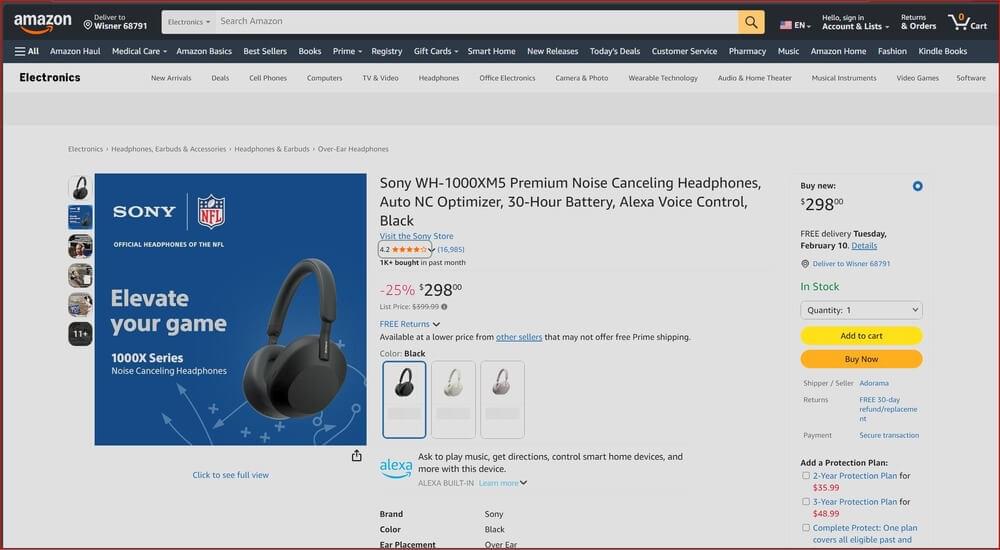
The response shows:
- Prices in US Dollars (USD)
- US sales tax information
- US-specific product availability
- amazon.com seller rankings and Prime eligibility
Now change only one parameter (from country=US to GB).
1 | crawlbase_api_parameters = { |
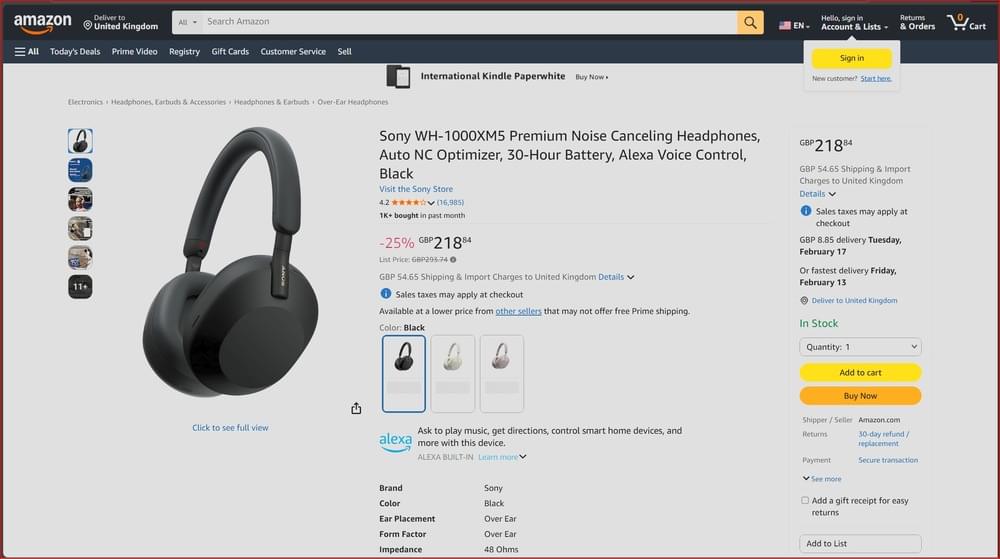
The UK response shows:
- Prices in British Pounds (GBP)
- VAT-inclusive pricing (20%)
- Different availability based on local inventory
- Amazon.co.uk specific deals and Prime benefits
This is request-level geo-targeting in practice.
How Do You Scrape ZIP-Level Pricing With Smart AI Proxy
Country-level targeting works for broad comparisons, but it falls short when you need accurate pricing. For Amazon’s specific case, it does not show a single price for the entire US. What customers see depends on their delivery ZIP code, and that difference affects total cost, availability, and delivery promises.
Crawlbase Smart AI Proxy solves this specific problem for Amazon by letting you pass ZIP-level context directly with the request. Instead of running a browser to set a delivery location, you include both country and zipcode parameters, such as country=US&zipcode=10001.
The result is Amazon HTML that matches what a real customer in that ZIP code would see, without browser automation, cookie management, or fragile UI workflows.
Supported Countries for ZIP/Postal Code Targeting:
- Americas: United States, Canada, Brazil, Mexico
- Europe: United Kingdom, Germany, France, Spain, Italy, Netherlands, Sweden, Poland
- Asia-Pacific: Japan, India, Singapore, Australia
- Middle East: United Arab Emirates, Saudi Arabia
All ZIP codes are pre-validated to ensure they’re recognized by the target e-commerce site.
Practical example: Amazon product pricing across countries
Let’s compare Amazon pricing for the same product between the US and the UK. (You can see this full code example in our GitHub page)
1 | import requests |
Result:
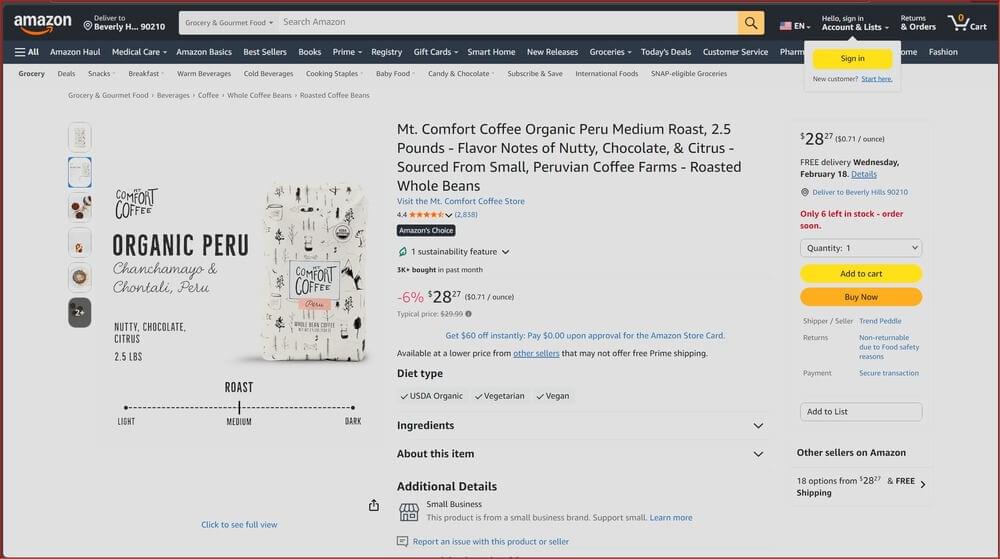
- Price: $28.27
- Delivery location: “Deliver to Beverly Hills 90210.”
- Sales tax: 9.5% California sales tax
- Prime delivery: Location-specific delivery estimates
Now change one line.
1 | crawlbase_api_parameters = { |
Result:
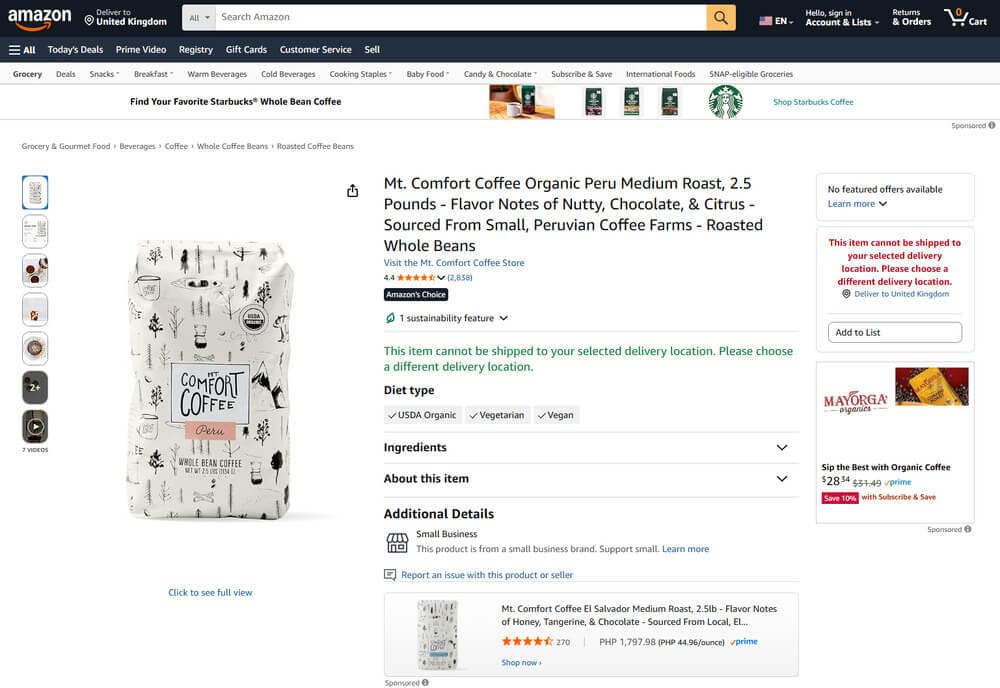
In this case, the same product is not available on Amazon UK at the time of scraping. This is not a formatting difference or a currency issue. It reflects real availability constraints in that market.
Without geo-accurate targeting, you might incorrectly assume a product is globally available, misjudge competitive pressure, or make pricing decisions based on data that customers in a given region never actually see. ZIP- and country-level accuracy turns Amazon scraping from a rough signal into something you can rely on for pricing analysis and market decisions.
Real-World Use Cases for Geo-Targeted Scraping
E-commerce price monitoring by country or city
To stay competitive, teams need to know what customers in each market actually see, not a converted or averaged price.
With geo-targeted scraping, this usually means running automated daily crawls on Amazon or other marketplaces using country- or city-specific targeting.
A typical workflow looks something like this:
1 | markets = [ |
Each run produces pricing data that reflects real local conditions. Over time, this gives you a reliable view of how competitors adjust prices by market and where meaningful gaps exist.
Local SEO and SERP Tracking
Search engines personalize results in several ways, and location is one of the biggest factors. Google’s documentation confirms that your search results can differ from someone else’s results based on where you are when you make the query.
For SEO professionals, this means you cannot rely on rank data pulled from a single location to represent how audiences in different regions experience search visibility. Running geo-targeted rank tracking lets you understand how your site performs across markets, whether you’re measuring organic positions, featured snippets, or local pack results.
Market Research and Competitive Intelligence
Market expansion usually fails before execution begins. Pricing, availability, and competitive pressure change once you look at a market from the inside instead of relying on global or home-country views.
Manual checks do not scale beyond a few regions. Geo-targeted scraping does. Pulling data from local versions of e-commerce sites shows what customers actually see, not converted prices or inferred availability.
Example scenario: A US brand evaluating Europe scraped localized data from Germany, France, and Spain and found:
- Prices are about 20% higher in France than in Germany
- Over-saturated categories in Spain
- Strong demand for a product line they planned to drop
That changed their launch plan before money was spent. Without local data, they would have optimized for conditions that were not real.
How to Implement Smart AI Proxy in Production
If you already operate crawlers or data pipelines, Smart AI Proxy does not require you to rethink your setup. There is no browser layer to maintain and no new orchestration model to introduce. It slots into existing HTTP-based workflows.
Step 1: Get your Authentication Key: Get your Crawlbase authentication key from the dashboard. New accounts receive 5,000 free requests for testing.
Step 2: Install Dependencies
1 | pip install requests urllib3 |
Step 3: Send your first geo-targeted request: Use the examples in this guide or a ready-made script from ScraperHub. You only need to route traffic through the Smart AI Proxy endpoint and set request-level parameters.
Step 4: Prepare for production
At this stage, you treat it like any other data pipeline:
- Add retries and basic error handling
- Apply rate limits aligned with your plan
- Monitor response anomalies instead of raw failure counts
- Store raw HTML alongside parsed output for verification
Step 5: Optimize Costs
- Use normal requests when Headless Browsers are not needed (cuts cost in half)
- Cache pages that change infrequently
- Batch requests to reduce overhead
Ready to Scale Your Geo-Targeted Data Collection?
Geo-targeted scraping doesn’t need VPNs, managing proxy pools, or automating browsers when you control location at the request level. Smart AI Proxy automatically handles IP selection, rotation, block mitigation, and ZIP-level cookie management. You simply specify the country and ZIP code in your headers.
Whether you are monitoring Amazon prices in different markets, tracking local SERPs, or collecting competitive intelligence by area, this method scales from testing to production without extra work.
Sign up for Crawlbase to receive 5,000 free requests and test geo-targeted scraping for your specific use case. Compare the results against your current setup; most teams notice the improvement in data accuracy right away.
Frequently Asked Questions (FAQs)
Q: How many countries does Smart AI Proxy support?
A: Smart AI Proxy supports over 195 countries for country-level targeting. For ZIP/postal code targeting on Amazon, it supports more than 20 countries, including the US, Canada, UK, Germany, France, Japan, India, Australia, and key markets across Europe, Asia-Pacific, and the Middle East. All ZIP codes are pre-validated to ensure compatibility.
Q: Can I target specific cities within a country?
A: Yes, for Amazon scraping, you can achieve city-level accuracy using the zipcode parameter (e.g., country=US&zipcode=10001 for New York City). For other sites, city-level targeting depends on how the target website uses geolocation. Most sites respond to country-level IP targeting, while some consider additional headers and cookies, which Smart AI Proxy manages automatically.
Q: What’s the difference between country and zipcode parameters?
A: The country parameter targets broad geo-locked content like currency, language, and regional availability. The zipcode parameter, currently for Amazon, adds context for the delivery location, affecting pricing, taxes, shipping costs, and local inventory. For example, country=US shows USD pricing, while country=US&zipcode=90210 shows exact pricing with California sales tax and delivery estimates for Beverly Hills.
Q: Can I use Smart AI Proxy for websites other than Amazon?
A: Yes. Smart AI Proxy works with most websites, including Google, e-commerce platforms, local marketplaces, and SERP tracking. The country parameter works universally. ZIP-level targeting is currently optimized specifically for Amazon across more than 20 countries.