Scraping local business listings from Google Maps, Yelp, and Yellow Pages gives sales, marketing, and research teams structured data at a scale that manual collection cannot match. This guide shows you how to build a Python pipeline using Crawlbase that retrieves fully rendered listing pages and extracts structured fields, including business name, address, phone number, hours, and ratings, across hundreds of cities in a single run.
For the complete production-ready implementation, refer to the Project repository on ScraperHub
What Is Local Business Listing Data?
Local business listing data is the structured information you see when searching for services in a specific area. When you look up something like “plumbers in Austin” or “restaurants in Denver,” the results are built from standardized fields that describe each business.
At a minimum, this typically includes:
• Business name
• Address
• Phone number
• Opening hours
• Rating and reviews
Most platforms, including Google Maps, Yelp, and Yellow Pages, present this information in a consistent format because it needs to be searchable and comparable across locations.
This data is used in practice for:
- Lead generation: building targeted prospect lists by city or category
- CRM enrichment: keeping sales records up to date with verified contact info
- Competitive research: mapping competitor density and ratings across markets
The value comes from having that information structured and consistent across many cities.
Why Scraping Local Listings Is Difficult
Collecting this data at scale is not as straightforward as sending requests and parsing HTML. The difficulty comes from how local platforms generate and protect their results.
Geo-Dependent Results
Local search results are tied directly to location. A simple query like “plumbers” will return completely different businesses depending on whether the request comes from Austin, Denver, or Phoenix.
To get reliable data, you need to control both:
• the query itself (include the city)
• the request location (geo-targeting)
Without that, results shift unpredictably, and datasets become inconsistent.
JavaScript Rendering
Most modern listing platforms do not return complete content in the initial response.
Instead, the server returns a basic HTML structure, and listings are injected later through JavaScript.
This means a standard HTTP request often misses the actual business data entirely. Without rendering the page like a browser, you end up with incomplete results.
Blocking and Rate Limits
Once you scale beyond a few requests, platforms start applying restrictions.
Common issues include:
• IP blocking
• CAPTCHA challenges
• and Request throttling
These protections make large-scale scraping unreliable unless you handle them properly.
Why Use Crawlbase for Local Listing Scraping
This is where Crawlbase fits in. Instead of building and maintaining your own scraping infrastructure, you use it as the retrieval layer.
Crawlbase supports both Standard and JavaScript-based requests, depending on the type of page you’re scraping:
• Use the Normal token for simple, static pages
• Use the JavaScript token for dynamic pages like Google Maps and Yelp
When using the JavaScript token, the page is rendered the same way a real browser would load it. That means the HTML you receive already includes dynamically loaded listings.
At the same time, Crawlbase handles:
• Proxy rotation and IP management
• Anti-bot protections
• Geo-targeted requests
This combination solves the core issues outlined earlier.
The main advantage is consistency. You’re working with:
• complete, rendered pages when needed
• fewer blocked requests
• stable responses across locations
Instead of debugging infrastructure issues, you can focus on extracting and structuring the data.
This becomes especially important when running the same queries across hundreds of cities, where small inconsistencies quickly affect data quality.
What You’re Building
At a high level, the pipeline starts with a query and a city. For example, “plumbers in Austin.” This input is sent to the Crawlbase Crawling API, which retrieves the page on your behalf.
Instead of returning partial HTML, Crawlbase can load the page like a real browser, so the response already includes all dynamically rendered listings. This is important for platforms like Google Maps and Yelp, where most of the content is loaded after the initial request.
Once the rendered HTML is returned, your parser extracts the fields you care about, such as name, address, phone number, hours, and ratings. Each listing is then converted into a structured format.
The result is a clean JSON dataset that can be used directly for lead generation, CRM systems, or analysis.
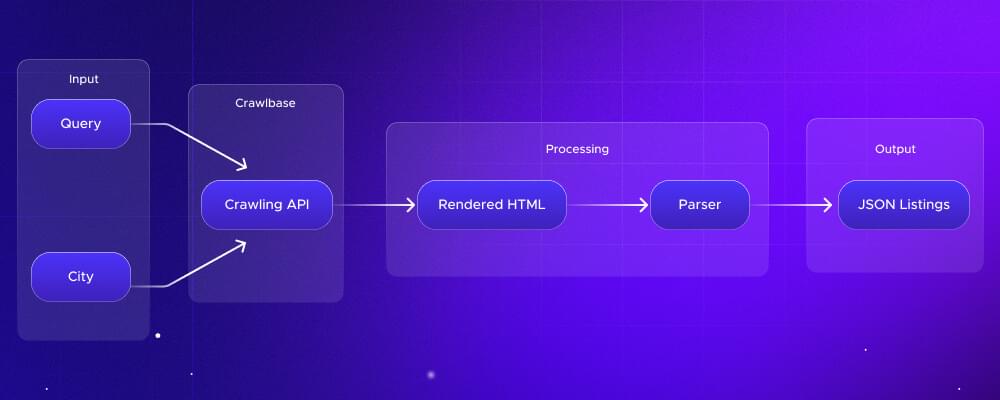
This separation between retrieval and parsing is what makes the system scalable across multiple cities and sources.
Step-by-Step: Building the Scraper
To implement this pipeline, you can use the complete working scraper available in the ScraperHub repository.
The steps below show how to set it up locally and run it end-to-end.
Step 1: Get the Code from ScraperHub
Start by downloading the project.
From the ScraperHub repository:
• clone the repository
• or download it as a ZIP and extract it
Example (using git):
1 | git clone https://github.com/ScraperHub/how-to-scrape-local-business-listings.git |
After cloning, your project structure should look like this:
• config.py → handles tokens, retries, settings
• fetcher.py → Crawlbase API requests
• url_builder.py → builds URLs for Google Maps, Yelp, Yellow Pages
• parser.py → extracts structured data
• main.py → entry point (CLI)
Step 2: Set Up Your Environment
Create a virtual environment and install dependencies:
1 | python3 -m venv .venv |
Next, set your Crawlbase tokens as environment variables:
1 | export CRAWLBASE_TOKEN=your_normal_token |
Notes:
• both tokens are required
• the JS token is needed for Google Maps and Yelp
• token loading is handled in config.py
Step 3: Run the Scraper (Single City)
Run your first test:
1 | python main.py "plumbers" --cities "Austin" -o output.json |
What happens here:
• builds the query URL
• fetches the page via Crawlbase
• parses listings
• writes structured JSON output
Step 4: Scale Across Multiple Cities
Scale the same query across cities:
1 | python main.py "restaurants" --cities "Austin" "Denver" "Phoenix" -o listings.json |
This is the core of multi-city scraping.
Instead of one dataset, you now collect listings across multiple markets in a single run.
Step 5: Use Geo-Targeting
For international or location-specific accuracy:
1 | python main.py "electricians" --cities "London" --country UK |
This ensures results match the target market.
Step 6: Switch Data Sources
You can switch between platforms.
Example using Yelp:
1 | python main.py "plumbers" --cities "Austin" --source yelp |
Supported sources include:
• Google Maps
• Yelp
• Yellow Pages
URL generation is handled in url_builder.py.
Step 7: Scale With Enterprise Crawler
For larger workloads, such as running hundreds of cities across multiple queries, the Crawling API works well for on-demand requests. However, when you’re dealing with large batches of URLs, the Enterprise Crawler is a more suitable option.
It’s designed for bulk processing using an asynchronous, push-based model.
The transition is simple. You can reuse your existing setup and add:
1 | params["callback"] = True |
Instead of sending a request and waiting for each response, you simply push your URLs to the Crawler. It processes everything in the background, and the results are delivered once they’re ready.
In terms of handling the results, you can choose how you want to receive the results.
• Crawlbase Cloud Storage: Crawlbase stores the data for you, and you can retrieve it later
• Webhook: results are sent directly to your endpoint as soon as they’re ready
If you go with a webhook, you’ll need to set up an endpoint to receive the data and store it in your system.
Check the Enterprise Crawler documentation for the complete details.
Conclusion
Scraping local business listings only becomes useful when it scales across locations. Collecting a few results manually is easy. Building a system that can consistently extract structured data across hundreds of cities is where the real value comes in.
That comes down to three things working together:
• Geo-targeted queries for accurate local results
• Reliable page retrieval for complete data
• Structured parsing for usable output
Crawlbase handles the retrieval layer, so you don’t have to deal with rendering issues, blocking, or proxy management. That lets you focus on building datasets that are actually usable for lead generation, sales, or analysis.
To get started, create a Crawlbase account and get your API tokens. Use your 1,000 free requests to test the full pipeline before scaling.
Frequently Asked Questions
Can I scrape multiple cities at once?
Yes. Pass multiple cities in a single command using the --cities flag. The scraper runs the same query across each location and combines results into one structured JSON file.
What Crawlbase tokens do I need to run this project?
You need both the normal token and the JavaScript token.
• CRAWLBASE_TOKEN is used for standard requests
• CRAWLBASE_JS_TOKEN is required for JavaScript-heavy pages like Google Maps and Yelp
Without the JavaScript token, most listing data will not load properly because the content is rendered dynamically.
You can find your tokens in your Crawlbase account dashboard.
Can I switch data sources?
Yes. The scraper supports multiple platforms. You can switch sources using the –source flag, for example:
• --source yelp
• (other sources supported in url_builder.py)
Each source has slightly different HTML structures, but the parser normalizes the output into a consistent format.
How do I handle large-scale scraping (hundreds of cities)?
For larger workloads, you can use the Crawlbase Enterprise Crawler. Instead of making synchronous requests, you push URLs and receive results via webhook. This improves throughput and avoids bottlenecks when processing thousands of queries.