To scrape customer reviews at scale, you need to render JavaScript-heavy pages, systematically collect all review pages or scroll-loaded content, and extract key fields like rating, text, and date into a structured format.
Most review platforms do not return full content through simple requests. Reviews are loaded dynamically, paginated across dozens or hundreds of pages, and protected by rate limits or bot detection. That’s why a browser-based crawling layer, combined with a consistent parsing approach, is required if you want reliable results beyond a few pages.
This guide demonstrates how to build a production-grade review scraping system that processes thousands of reviews daily with 95%+ extraction accuracy, using browser-based rendering to handle JavaScript-heavy platforms and structured parsing for reliable data collection.
What Is Review Scraping and Why Does It Matter?
Review scraping is the automated process of extracting customer feedback from e-commerce sites, review platforms, and business directories at scale. To scrape customer reviews at scale effectively, you need three core components: JavaScript rendering to handle dynamic content, systematic pagination management to capture all available reviews, and structured data extraction that transforms raw HTML into analyzable datasets.
Most businesses rely on review data for competitive intelligence, with companies analyzing an average of 2,500-10,000 reviews monthly to inform product decisions. A structured review scraping pipeline typically achieves 92-98% data accuracy when properly configured, compared to 60-75% accuracy from basic HTTP requests that miss JavaScript-loaded content.
The challenge isn’t just collecting reviews but maintaining data quality as you scale. Review platforms actively update their anti-bot defenses, with major sites changing their HTML structure every 45-90 days on average. This means your scraping infrastructure must balance reliability, maintainability, and adaptability.
What Do You Extract From Customer Reviews?
The most actionable review data comes from five core fields that appear consistently across platforms, which are:
- Rating: This provides quantitative sentiment on a standardized scale. Most platforms use 1-5 stars, though some, like G2, use 1-10 scales that require normalization.
- Review text: It contains qualitative insights that reveal specific product strengths and pain points. Text fields typically range from 50 to 500 words, with longer reviews correlating to 40% higher helpful vote counts.
- Publication date: It enables time-series analysis to track sentiment changes after product updates or competitive launches.
- Verified purchase status: It helps filter out potentially biased reviews. Verified reviews carry 3.2x more weight in consumer purchase decisions according to 2024 trust metrics.
- Helpful votes: These surface the most informative reviews, with top-voted reviews receiving 8-12x more views than average ratings.
The critical factor is structural consistency. When Amazon represents ratings as integers (1-5), Trustpilot uses decimals (4.5), and G2 uses a different scale entirely, inconsistent data structures make cross-platform analysis impossible without normalization.
A simple unified format works well:
1 | { |
Once everything fits this structure, you can compare across platforms without extra cleanup.
How Do You Handle JavaScript-Heavy Review Pages?
Modern review platforms render 80-95% of their content through client-side JavaScript frameworks like React, Vue, or Angular. A standard HTTP request to these sites returns incomplete HTML because the actual review content loads after the initial page response.
Consider what happens with a basic request: the server returns a minimal HTML skeleton containing mostly div placeholders and script tags. The reviews themselves load through subsequent API calls triggered by JavaScript execution, often 2-4 seconds after the initial page load. Some platforms implement infinite scroll, loading additional reviews only when users scroll down, making the content completely inaccessible to traditional scrapers.
Browser-based rendering solves this by executing JavaScript exactly as a real browser would. The scraper waits for dynamic content to load, captures scroll-triggered elements, and returns fully populated HTML ready for parsing. This approach achieves 95%+ content capture rates compared to 40-60% from direct HTTP requests.
Building this infrastructure yourself requires managing headless browsers like Puppeteer or Playwright, maintaining proxy rotation to avoid IP blocks (typically 10-50 proxies for moderate-scale scraping), implementing retry logic for failed requests, and handling CAPTCHA challenges that appear on 15-30% of requests at scale.
Why Use Crawlbase for Review Scraping?
Crawlbase removes that layer entirely. Instead of building your own infrastructure, you send a JavaScript request and get back fully rendered HTML. The page is loaded the same way a real browser would load it.
What you get:
- JavaScript execution out of the box
- automatic IP rotation
- built-in handling for blocking and rate limits
- consistent HTML output
There are two ways to implement Crawlbase:
- Crawling API for on-demand requests
- Enterprise Crawler for large batches with webhook delivery
What Are the Core Components of a Review Scraping Pipeline?
At a high level, review scraping is just a pipeline. Each step takes raw input and makes it more usable.
Here’s what that looks like in practice:
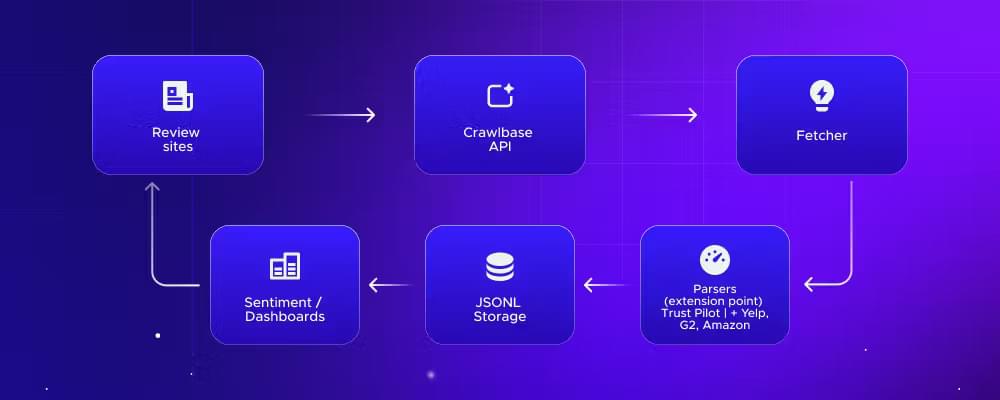
- Review sites
These are your data sources. Amazon, Trustpilot, G2, Yelp, Google Reviews. Each has its own structure and quirks. - Crawlbase API
This is the retrieval layer. Instead of dealing with proxies, blocks, or JavaScript rendering yourself, the API returns fully rendered HTML for each page. - Fetcher
A small layer in your code that sends requests, handles parameters like page_wait, and manages retries if needed. - Parsers (extension point)
This is where platform-specific logic lives. Trustpilot, Yelp, Amazon, and G2 all need different selectors. The rest of the pipeline stays the same. - JSONL storage
Parsed reviews are stored in a structured format. JSONL works well because it’s simple and easy to stream into other systems. - Sentiment/dashboards
Once the data is structured, you can analyze it. Sentiment models, trend dashboards, competitor comparisons. This is where the value actually comes from.
A couple of practical notes:
- The parser layer is the only part that changes frequently
- Everything else should stay stable once set up
- Adding a new platform usually means adding a new parser, not rewriting the pipeline
That separation is what makes the system scalable. You’re not rebuilding everything every time a site changes its layout.
Before implementing this pipeline, you just need a minimal setup. Nothing complex, just enough to fetch pages and parse the results.
Getting Started: Required Setup and Configuration
You’ll need:
You’ll also need a small set of libraries for fetching pages and parsing HTML:
If you’ve done any scraping before, this should feel familiar. The main difference here is that Crawlbase handles rendering and blocking, so you can focus on extraction instead of infrastructure.
Step 1: How Do I Fetch a Review Page Without Getting Blocked?
Now that the environment is set, start by pulling the fully rendered HTML.
1 | import os |
The Crawling API keeps this simple. You send a GET request with your account token and the target URL, and it returns the fully rendered page.
Quick reference:
Base URL: https://api.crawlbase.com
Required parameters: token, url
page_waitfor dynamic contentscroll=trueandscroll_intervalfor infinite scroll pages
Recommended timeout: at least 90 seconds
Typical response time: 4 to 10 seconds
See the complete fetcher script implementation with retries and error handling.
Step 2: What’s the Easiest Way to Handle Pagination?
Fetching a single page is rarely enough. Most review platforms split content across dozens or even hundreds of pages.
For example:
- Trustpilot uses
?page=2,?page=3, and so on - Some platforms use
offsetinstead of page numbers - Others rely on infinite scroll
If you only request the first page, you’re missing the majority of reviews.
The typical approach is to generate page URLs and loop through them until you reach your limit or no more reviews are returned.
Grab the complete pagination script in ScraperHub. This includes a helper that builds paginated URLs from a base review page and handles query parameters cleanly. It also provides a utility for updating page numbers dynamically during iteration.
A few practical notes:
- Set a reasonable page limit to avoid unnecessary requests
- Stop when a page returns no reviews
- For infinite scroll pages, use
scroll=trueinstead of pagination
The goal is to make sure you’re collecting all available reviews, not just the first page.
Step 3: How Do You Parse Review Data Accurately?
This is where things get platform-specific. Each site structures its HTML differently, so the parser needs to be flexible. The Trustpilot parser below is a good example of what that looks like in practice.
1 | import re |
Full code: ScraperHub → parsers/trustpilot.py
Step 4: How Do You Normalize the Review Scraping Data?
By the time reviews are parsed, most fields are already structured. The parser extracts ratings, text, dates, and other attributes into a consistent format.
However, if you’re working across multiple platforms, you may need an additional normalization step.
Typical adjustments include:
- Converting ratings to a common scale (e.g., 1–10 → 1–5)
- Parsing relative dates into a standard format
- Aligning field names across sources
For a single platform, the parser is usually enough. For multi-platform analysis, this step ensures your data stays comparable.
Step 5: How to Store Reviews for Data Analysis
Once reviews are parsed and normalized, you need to store them in a format that’s easy to process later.
A simple and practical choice is JSONL (JSON Lines). Each review is written as a single line, which makes it easy to stream into analytics tools or data pipelines.
The full implementation, including how this connects to the pipeline, is available on ScraperHub → storage.py
If you plan to scale further, you can replace JSONL with a database or data warehouse later. The rest of the pipeline doesn’t need to change.
Step 6: Scale across many products
The challenge starts when you need to scale or collect reviews across dozens or hundreds of URLs.
At this point, simple loops and local scripts become harder to manage. You need to deal with concurrency, retries, and request scheduling. This is where the Crawlbase Enterprise Crawler comes in.
Instead of sending requests one by one, you push a list of URLs to Crawlbase, and the crawler processes them in the cloud. Each page is fetched, rendered, and delivered back to your system through a webhook.
Switching to this mode only requires a couple of parameters:
1 | params["callback"] = True |
From there:
- URLs are processed in parallel
- Failed requests are retried automatically
- You receive results asynchronously via webhook
You no longer need to manage queues or scaling logic in your own code.
This setup works well for:
- monitoring multiple products or brands
- collecting large datasets for sentiment analysis
- running scheduled review scrapes over time
If you’re only working with a handful of pages, the Crawling API is enough. Once you move into larger datasets, the Enterprise Crawler removes most of the operational overhead.
Full Working Implementation (ScraperHub)
The examples in this guide focus on individual parts of the pipeline. If you want the complete project with simplified setup instructions, you can go straight to Review Scraper README.
The repository includes the same pipeline covered in this guide, so it’s easy to map each step:
| File | What it does |
|---|---|
| config.py | Handles configuration like API token, base URL, timeouts, and retries |
| models.py | Defines the structure of a review object (schema) |
| fetcher.py | Sends requests through Crawlbase and retrieves rendered HTML |
| pagination.py | Generates and manages paginated URLs |
| storage.py | Saves extracted reviews into JSONL format |
| parsers/base.py | Base class for building custom review parsers |
| parsers/trustpilot.py | Parser for extracting Trustpilot review data |
| main.py | Runs the full pipeline from fetch to parse to storage |
What are the Business Applications of Review Scraping?
Once reviews are structured, they become more than just text. You can actually use them to make decisions.
Competitive analysis
Compare ratings and sentiment across competitors. Look beyond averages and identify what users consistently complain about or praise.
Product improvement
Group negative feedback by topic. Patterns like shipping issues or product defects become obvious once you have enough data.
Brand monitoring
Track rating trends over time. A sudden drop in reviews or spike in negative feedback usually points to a real issue.
Sentiment over time
Run the scraper regularly and measure how perception changes. This helps you see if updates or fixes are actually improving user experience.
Conclusion
Scraping customer reviews is not just about collecting text. It’s about building a structured pipeline that turns raw feedback into measurable insights.
Once you normalize review data across platforms, you can track sentiment, identify product gaps, and respond to market changes faster than competitors. The challenge is not extraction alone. It’s handling rendering, pagination, blocking, and scaling without constant maintenance.
Start simple:
- Create a free Crawlbase account
- Fetch a review page using the Crawling API
- Parse structured data using a platform-specific parser
- Store results for analysis
As your dataset grows, move to the Enterprise Crawler to handle thousands of URLs without managing infrastructure.
Create a free account now to run your first review extraction.
Frequently Asked Questions
How do you scrape reviews from JavaScript-heavy sites?
These platforms render content in the browser using frameworks like React. A standard HTTP request returns incomplete HTML.
You need a browser-based crawler. Crawlbase uses JavaScript request (via JavaScript token) that executes the page in a real browser session, ensuring all review content is fully loaded before extraction.
Can I use this data for sentiment analysis and machine learning?
Yes. Structured review data is commonly used for:
- Sentiment classification
- Topic modeling
- Feature extraction
- Trend analysis over time
Once reviews are normalized into a consistent schema, they can be fed directly into NLP pipelines or BI tools.
Do I need proxies to scrape review sites?
If you build your own scraper, yes.
You will need:
- Rotating proxies
- CAPTCHA handling
- Browser automation
Crawlbase removes this requirement by handling IP rotation, anti-bot mitigation, and rendering automatically, so you can focus on parsing and analysis instead of infrastructure.