Quick Answer
Instead of operating your own proxy fleet or headless browser infrastructure, your application generates search queries, sends them through a single endpoint, and receives usable results that can be normalized and served to users. This approach scales from prototype to high-volume workloads without collapsing due to IP bans, CAPTCHA, geo mismatches, or rate limits.
Smart AI Proxy becomes the data collection layer of your search pipeline. Your code handles query logic and product features, while Crawlbase manages network-level reliability and access to search engines across regions. The sections below walk through the real constraints of SERP scraping and demonstrate how to implement a working tool end-to-end using this approach.
Why Is Scraping Search Results at Scale So Difficult?
Fetching a few search pages is easy. Fetching thousands every hour without getting blocked is not. Search engines are optimized for human use, and automated traffic stands out quickly.
1. IP Blocking and Bans
If many requests originate from the same address, they start to look suspicious. Once thresholds are crossed, responses may switch to errors, empty pages, or verification prompts. A single cloud instance can work during testing and then fail once real traffic arrives.
2. Geo-Restrictions and Localized Results
Search results are not universal. A query from London can produce different rankings and local listings than the same query from New York or Berlin. If your application depends on region-specific data, requests must appear to come from those locations.
3. CAPTCHA and Anti-Bot Measures
Modern search platforms rely on layered defenses. Even when a request succeeds technically, the returned page may be a challenge rather than the actual results. Handling these systems reliably requires infrastructure that adapts continuously.
4. Rate Limits and Throttling
High-frequency traffic from identifiable sources is shaped or blocked. Without distribution across many routes, throughput eventually drops to zero regardless of how efficient your code is.
Building all of this internally means maintaining proxy pools, monitoring failures, rotating addresses, and reacting to changes in detection systems. For most teams, that becomes an operational burden rather than a differentiating feature.
Why Is Smart AI Proxy Rotation the Best Fix for SERP Scraping?
Crawlbase Smart AI Proxy sits between your application and the target site. You configure it like a normal proxy, send requests as usual, and receive responses as if you had connected directly. The difference is that each request is routed through infrastructure designed specifically for automated data collection.
Key characteristics:
• Requests are distributed across many IPs instead of one
• Traffic patterns are tuned to avoid common block triggers
• Location targeting can be applied when needed (Premium)
• No special client libraries are required
Optional behavior is controlled through the CrawlbaseAPI-Parameters header. For example, structured parsing for Google can be enabled without changing your request logic.
Connection details:
- HTTPS (recommended):
https://smartproxy.crawlbase.com:8013 - HTTP:
http://smartproxy.crawlbase.com:8012 - Authentication: Your Crawlbase token or authentication key as the proxy username.
Important: When routing through Smart AI Proxy, SSL verification for the destination is typically disabled because the proxy must inspect traffic to apply routing logic and response handling. In Python, this corresponds to verify=False.
Try our AI-powered Proxies

Code Overview: What Does This SERP Tool Actually Do?
A SERP tool consists of multiple components, but only one communicates with external search engines. Smart AI Proxy sits at this boundary as the outbound data collection layer.
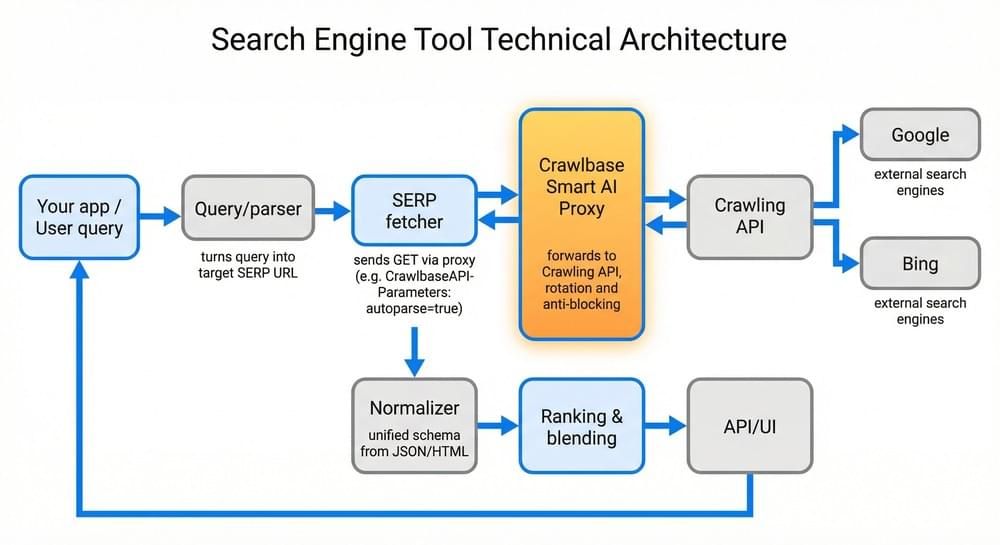
Simplified flow of the Search Engine Tool Architecture:
- A user submits a query.
- Your application builds the corresponding search URL.
- The request is sent through Smart AI Proxy.
- Results are returned from the search engine.
- The data is normalized and stored or displayed.
Because every outbound request goes through the proxy, the rest of your system remains insulated from blocking issues.
How to Fetch SERP Data Using Smart AI Proxy
A production-ready SERP tool follows this end-to-end flow:
- Accept query - Your app receives a user search string.
- Query normalization - Convert input into a valid search engine URL.
- SERP retrieval - Send the request through Smart AI Proxy.
- Structured extraction - Receive machine-readable data (JSON).
- Downstream - It stores, ranks, filters, or displays results.
A functional search engine tool needs a repeatable process that turns text input into structured results. In practice, the fragile part is not parsing or storage but maintaining access to the source sites as volume grows. Smart AI Proxy removes that instability, so the pipeline behaves consistently.
You can implement this workflow in any programming language that can send standard HTTP requests. For this guide, the examples use Python because it is widely available and easy to run locally, but the same approach works with Node.js, Go, Java, C#, etc.
Increasing traffic mostly should affect cost and processing capacity rather than reliability once the proxy layer is in place.
Step 1: Accept and Normalize the User Query
Search engines expect properly encoded parameters. Raw input such as:
1 | best coffee shops Paris |
Converted into a valid URL:
1 | https://www.google.com/search?q=best+coffee+shops+Paris |
Encoding ensures special characters, spaces, and non-ASCII text do not break the request. In Python, this is handled with quote_plus.
Step 2: Construct the Target SERP URL
The URL should be generated programmatically. For a basic Google query, only the q parameter is required, but production systems often support additional options such as:
• Pagination
• Language parameters
• Safe search flags
• Device variants
• Regional targeting (Premium feature)
Keeping URL construction in one place makes it easier to extend later.
Step 3: Route the Request Through Smart AI Proxy
Direct requests to search engines quickly fail under load. Instead, configure your HTTP client to use Smart AI Proxy as the outbound gateway.
Key configuration elements:
• Proxy endpoint (HTTP or HTTPS)
• Authentication using your Crawlbase token
• Standard proxy configuration in your HTTP library
From your application’s perspective, this behaves like any corporate proxy. The difference is that requests are transparently routed through infrastructure optimized for scraping workloads.
Step 4: Request Structured Results
Smart AI Proxy supports passing parameters via the CrawlbaseAPI-Parameters header. To parse the HTML content automatically, simply add:
1 | autoparse=true |
The response includes organic results, ads, local packs, related questions, and status information in JSON format. This removes the need for manual HTML parsing in many scenarios.
Step 5: Handle Response Validation and Errors
Production systems should verify that the request succeeded before processing the payload. Typical checks include:
• HTTP status codes
• Proxy status indicators
• Presence of expected fields
• Retry logic for transient failures
The example below performs basic validation using raise_for_status().
Step 6: Integrate With Your Application Pipeline
Once retrieved, SERP data can support many use cases:
• Building a custom search interface
• Competitive analysis tools
• SEO monitoring dashboards
• Market research datasets
• AI Training datasets
Most systems normalize results into a consistent schema before storage to support analytics and ranking operations.
Simple End-to-End Example of a Search Engine Tool
Below is a minimal Google SERP fetcher that uses Crawlbase Smart AI Proxy as the only outbound path to Google. It shows how to:
- Configure the proxy with your token or the Proxy Authentication key (passed via
CRAWLBASE_TOKEN). - Send a GET request to a Google Search URL.
- Pass
CrawlbaseAPI-Parameters: autoparse=trueso the response is structured JSON (no HTML parsing). You getoriginal_status,pc_status,url, and body withsearchResults,ads,snackPack, andpeopleAlsoAsk.
We omit the country parameter so the snippet works without the Premium plan.
Code Snippet: Google SERP fetcher in Python
1 | # Fetches a Google SERP via Crawlbase Smart AI Proxy. |
This snippet can run behind an API, worker queue, or scheduled job and serves as the data collection backbone of a larger system.
Additional Production of Search Engine Tool Examples
Bing SERP Fetcher (Normalized to Google Format)
Crawlbase offers a Bing SERP parameter that can return structured results directly, but the example here takes a different route on purpose. Instead of relying on structured output, it pulls the raw HTML through Smart AI Proxy and parses it locally with BeautifulSoup. This makes the logic transparent and easier to customize if you need fields that standard parsers do not expose.
Highlights of this implementation:
• Uses the same proxy setup as the Google fetcher
• Retrieves the standard Bing results page
• Parses content locally instead of relying on autoparse
• Produces output compatible with the Google schema
• Easy to modify if Bing’s layout changes
→ View the full Bing SERP fetcher on GitHub
Unified Google + Bing SERP Fetcher (Single Interface)
Most real systems do not depend on a single search engine. Traffic patterns change, availability varies, and different engines surface different information. The unified fetcher wraps both implementations behind one function so the rest of your application can treat them as interchangeable data sources.
The wrapper calls the appropriate fetcher, validates the response, and returns a normalized structure. Because the output shape is consistent, switching engines does not require changes to storage, ranking logic, or APIs.
This is the piece that turns separate scripts into something closer to production infrastructure.
What it handles:
• Choosing the search engine at runtime
• Verifying the response before processing
• Normalizing ads and organic results into the same format
• Returning a predictable structure every time
• Plugging cleanly into workers, APIs, or batch jobs
→ View the unified SERP fetcher on GitHub
→ Full example: Google + Bing SERP fetchers, unified API, normalized JSON
How Do You Scale a SERP Scraper Without Breaking It?
Scaling requires coordination across concurrency, geography, cost management, and reliability.
Concurrency
Use a job queue with multiple workers issuing requests through the same proxy endpoint. Rotation distributes traffic across independent routes.
Geo and device variation
If you need regional data, vary location parameters across requests. The same query can produce very different results depending on where it appears to originate.
Rate and cost control
Even with a proxy layer, unbounded traffic can create unnecessary failures or expense. Simple throttling on the client side usually solves this.
Resilience
Expect occasional transient errors. Retry with backoff and monitor status codes so temporary issues do not cascade into larger failures.
Why Use Crawlbase for Large-Scale SERP Data Collection
At scale, consistency matters more than peak performance. Occasional success is easy; sustained reliability is not. Smart AI Proxy provides a stable access layer without requiring you to operate your own proxy infrastructure.
Practical advantages include:
• Designed for sustained automated traffic
• No proxy pool maintenance
• Compatible with standard HTTP clients
• Centralized routing and mitigation
• Reusable across different crawling tasks
Treating this layer as infrastructure allows teams to focus on product features rather than connectivity problems.
Next Steps
If you want to turn this from a demo into something you can actually rely on, the process is straightforward:
- Create a Crawlbase account and get your authentication key
- Store the token in your environment variables or application config
- Run the fetcher with a few real queries to confirm everything works from your setup
- Adjust the normalization step so you keep only the data your product needs
- Deploy the fetch component behind a queue worker, API endpoint, or scheduled task
After this, the problem shifts from “How do we keep this scraper alive?” to “What do we want to do with the data?” Requests continue to flow, results stay consistent, and your team can focus on ranking, analysis, or product features instead of fighting blocks and CAPTCHA.
If you are unsure whether it will hold up for your use case, the quickest way to decide is to test it with your own queries. Crawlbase includes 5,000 free Smart AI Proxy requests, which is enough to observe real behavior under load without changing your existing architecture.
Sign up now, get your token, and run a few searches through the proxy to evaluate it with real data.