Building a scalable web data pipeline with Crawlbase involves using the Crawling API for real-time page retrieval and the Enterprise Crawler for automated large-scale collection, then feeding the results into an ETL system for parsing, transformation, and storage. This removes the need to manage proxies, IP rotation, or JavaScript rendering infrastructure internally, allowing reliable web data collection with your pipeline even as target sites change or deploy anti-bot defenses.
In this setup, Crawlbase sits as an ingestion layer at the front of the pipeline. It deals with blocked requests, JavaScript-heavy pages, and changing site behavior, while your internal systems handle transformation, validation, and analytics.
This guide walks through how to assemble a production-ready pipeline using Crawlbase for acquisition and standard ETL tools for downstream processing, whether you are monitoring a handful of pages or continuously ingesting data at scale.
Why Web Data Acquisition Breaks Pipelines
When a data pipeline starts producing gaps or stale numbers, the root cause is often the collection layer, not the analytics stack. If the input is unreliable, no amount of downstream processing can fix it.
Typical pain points look like this:
- A scraper that worked yesterday stops working after a site redesign.
- Requests start getting throttled or blocked, sometimes with CAPTCHA.
- When traffic patterns look automated, IP addresses lose reputation over time. Something providers like Cloudflare actively monitor.
- Pages load fine in a browser but return almost nothing to a basic HTTP request because the content is rendered with JavaScript.
- Jobs succeed technically but store empty or partial data, which is harder to detect than a hard failure.
The core problem is that external websites are not stable dependencies. They evolve constantly. A small layout tweak, a new experiment, or a backend optimization can change how content is delivered. Large platforms such as Google and Amazon push changes frequently, and those changes rarely consider third-party data extraction.
As the number of target sites increases, so does the maintenance. Each source has its own quirks, failure modes, and update cycle. What starts as a straightforward scraping task can quietly turn into ongoing operational work.
For pipelines that rely on web data, the safest approach is to treat acquisition as infrastructure that needs to tolerate change, not as a one-off script that will keep working indefinitely.
Where Crawlbase Fits in a Modern Data Stack
Crawlbase acts as the web data ingestion layer at the very beginning of the pipeline. It retrieves pages reliably while handling the complexities that typically break scrapers.
Crawlbase manages:
- Page retrieval across diverse websites
- JavaScript rendering for dynamic content
- IP rotation and request routing
- Block mitigation and reliability at scale
- Large-scale crawl execution
Your data systems handle:
- Parsing and transformation
- Data quality validation
- Storage and analytics
- Business logic and consumption
A typical data pipeline architecture looks like this:
Web → Crawlbase → ETL → Data Warehouse → BI / ML Systems
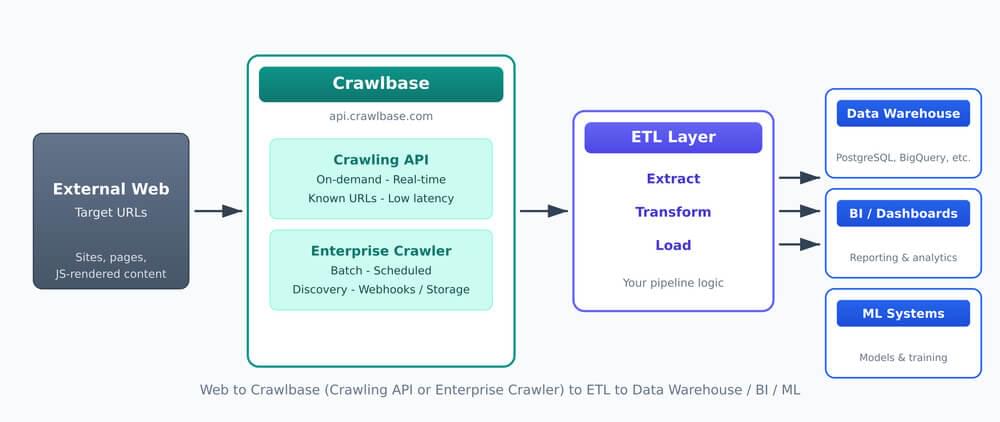
Crawlbase sits between the web and your ETL layer. The Crawling API handles on-demand extraction; the Enterprise Crawler handles batch and discovery. Both feed into your pipeline, which loads clean data into warehouses, BI, and ML systems.
This separation of concerns is critical. It allows data engineers to focus on processing and modeling rather than network-level scraping challenges.
What Are the Two Ways to Extract Web Data With Crawlbase?
Different workloads require different extraction approaches. Crawlbase provides two complementary tools designed for distinct pipeline patterns, which are:
- Crawling API for real-time and on-demand data extraction
- Crawler for enterprise-grade crawling
Crawling API: Real-Time, On-Demand Extraction
The Crawling API retrieves specific pages whenever your system requests them. It is designed for precision, low latency, and integration into backend services.
You send a simple HTTP GET request and receive the page response a few seconds later.
Example request format:
1 | curl 'https://api.crawlbase.com/?token=USER_TOKEN&url=encodedTargetURL' |
This basic request can be implemented in virtually any programming language, making it easy to embed into existing applications, services, or pipelines. Crawlbase also provides official libraries and SDKs that simplify authentication, request handling, and error management, allowing faster integration without building custom HTTP logic.
Best suited for:
- Microservices and backend applications
- Scheduled monitoring jobs
- Event-driven workflows
- Known lists of URLs
- Real-time data requirements
Typical Crawling API flow:
Trigger → API Request → Parse Response → Store Data
Example scenarios:
- Checking product prices on demand
- Enriching internal records with external data
- To monitor competitor pages at regular intervals
- Fetching documents or reports when events occur
Because the API responds immediately, it fits naturally into synchronous workflows and services that need fresh data.
Crawlbase Enterprise Crawler: Automated Large-Scale Crawling
The Enterprise Crawler is designed for continuous, site-wide collection. Instead of requesting individual pages, you define crawl rules and schedules. The system discovers pages, executes crawls, and stores results for later retrieval.
The Crawler jobs can be initiated via the API, but operate as a managed asynchronous crawl system. You only need to add two parameters to enable asynchronous crawling: &callback=true and &crawler=YourCrawlerName.
Example request:
1 | curl 'https://api.crawlbase.com/?token=USER_TOKEN&url=encodedTargetURL&callback=true&crawler=YourCrawlerName' |
Instead of returning the page content immediately, the API responds with a Request ID (RID), for example:
1 | { "rid": "1e92e8bf4618772871c14d4" } |
This indicates that the request has been accepted and placed in the processing queue.
You can retrieve the crawl results in two ways:
- Send results to your own webhook endpoint for full automation
- Use Crawlbase Cloud Storage as a built-in webhook alternative for a simpler setup
This asynchronous model allows large volumes of pages to be processed without blocking your application.
Best suited for:
- Monitoring entire websites or categories
- Recurring bulk collection
- Unknown or evolving URL sets
- Content discovery pipelines
- Large-scale dataset generation
Typical Crawlbase Crawler flow:
Configure Crawl → Scheduled Execution → Results Stored → Batch Processing
Example scenarios:
- Tracking millions of product pages across categories
- Monitoring news or media sources for new articles
- Building searchable content indexes
- Generating training datasets from public web sources
This approach removes the need to maintain URL inventories or discovery logic, which becomes increasingly complex at scale.
Integrating Crawlbase Into ETL Workflows
ETL stands for Extract, Transform, Load. In simple terms, you pull data from a source, reshape it into something structured, then store it in a central place like a database. Cloud providers such as Amazon (AWS) and Microsoft describe this process as the standard way organizations prepare data for reporting, analytics, and machine learning.
In a web data setup, Crawlbase effectively handles the extraction part by fetching the pages, while your pipeline takes care of transforming the raw content and loading the final results into storage.
Using the Crawling API in ETL Pipelines
A typical integration looks like this:
- Request page content through the API
- Parse the HTML or structured response
- Extract the fields you care about
- Clean and standardize the values
- Save the result to your database or warehouse
Teams often implement this with simple Python scripts, scheduled jobs, or workflow tools, depending on scale.
Destination systems commonly include:
- Relational databases such as PostgreSQL
- Cloud warehouses such as BigQuery
- Search systems such as Elasticsearch
- Streaming platforms such as Kafka
Because the API runs on demand, you can trigger these pipelines as often as needed, whether that is near real-time updates or periodic batch runs.
Using Crawlbase Enterprise Crawler Outputs in Batch Pipelines
Crawler outputs are normally consumed in batches with common patterns like:
- Set up a crawl project and schedule
- Crawlbase collects pages automatically
- Your pipeline fetches the completed results
- New or changed records are parsed and cleaned
- The processed data is written to your warehouse
It may also include the following processing strategies:
- Full dataset refreshes
- Incremental ingestion
- Change detection
- Storage for historical snapshots
This approach is well-suited to reporting, market monitoring, and other workloads where data freshness is measured in hours or days rather than seconds.
Automation Patterns for Data Pipeline
Production pipelines rely heavily on automation. Crawlbase integrates cleanly with common orchestration approaches, which typical includes:
Scheduler-based extraction: Cron jobs or cloud schedulers trigger API requests at defined intervals.
Workflow orchestration: Tools like Apache Airflow coordinate multi-step pipelines, handle dependencies, retry failed tasks, and provide visibility into job status.
Serverless pipelines: Event triggers invoke functions that fetch, process, and store data without dedicated servers.
Batch ingestion windows: Large datasets are processed during scheduled windows to optimize cost and performance.
In all cases, Crawlbase handles the extraction layer while orchestration tools manage processing and storage.
Decision Guide: API vs Enterprise Crawler
Choosing the right tool depends primarily on how data will be consumed.
Use the Crawling API when you need:
- Real-time or near real-time data
- Specific known URLs
- Low-latency responses
- Tight integration with backend services
- Fine-grained control over requests
Use Crawlbase Enterprise Crawler when you need:
- Ongoing monitoring of large sites
- Automatic discovery of new pages
- Recurring bulk collection
- Batch processing workflows
- Reduced operational involvement
Many production systems use both simultaneously. The API handles targeted retrieval while the Crawler maintains broad coverage.
How to Scale Without Building Scraping Infrastructure
As data needs grow, infrastructure complexity typically grows faster. Parallelization, reliability, and storage become major concerns.
Key scaling considerations include:
- Managing concurrent requests
- Handling failures and retries safely
- Ensuring idempotent processing
- Eliminating duplicate records
- Optimizing storage costs
- Monitoring data freshness and completeness
Building these capabilities internally requires significant engineering effort. Crawlbase externalizes much of this complexity. Scaling becomes a configuration task rather than a network engineering project.
This shift allows teams to invest in analytics, modeling, and product features instead of maintaining collection systems.
Next Steps to Scale Your Data Pipeline
A scalable web data pipeline depends on a reliable ingestion layer. Without it, downstream systems cannot produce consistent insights regardless of how advanced they are.
Crawlbase enables teams to treat web data as a stable input rather than a fragile custom project. The Crawling API provides precise, on-demand extraction for real-time needs, while Crawlbase Enterprise Crawler delivers automated, large-scale coverage for continuous monitoring.
By separating data acquisition from data processing, organizations can reduce operational overhead, improve reliability, and focus on generating value from data instead of fighting infrastructure.
If you are working with web data, try integrating Crawlbase now into your pipeline and see how much time and maintenance effort it can remove from your workflow.
Frequently Asked Questions (FAQs)
What is the difference between Crawling API and Crawlbase Enterprise Crawler?
The Crawling API retrieves specific pages on demand, making it ideal for real-time workflows. The Enterprise Crawler performs automated, large-scale crawling and discovery across entire websites on a schedule.
Can Crawlbase integrate with existing ETL pipelines?
Yes. Crawlbase functions as the upstream extraction layer and outputs data that standard ETL tools can process and load into storage systems.
Do I still need to manage proxies or anti-bot defenses?
No. Crawlbase handles IP rotation, request routing, and mitigation techniques required to retrieve pages reliably.
Is Crawlbase suitable for real-time applications?
Yes. The Crawling API supports low-latency, on-demand retrieval, making it suitable for backend services and monitoring systems that require fresh data.